
When using Airflow to run your dbt models, some use cases may require having the exact DAG run timestamp stamped directly into your data. This allows you to trace the specific orchestration run that generated a row or table. This becomes a necessity when you have multiple DAGs with processes that generate data. Or if the DAGs overlap in the models they trigger or if you are running backfills and need to distinguish between data related time and processing related time.
Pipeline visibility from Airflow to dbt
Why not just current_timestamp( )?
The first instinct for many engineers is to simply include a current_timestamp() column in their SQL to capture when the model ran. While useful for simple auditing, this approach has a critical flaw: it captures Wall Clock Time, not Logical Time.
Airflow template references
To solve this, we need to leverage Airflow’s internal Jinja templating engine. Airflow exposes several variables that contain run metadata. Here is the cheat sheet for the most relevant ones:
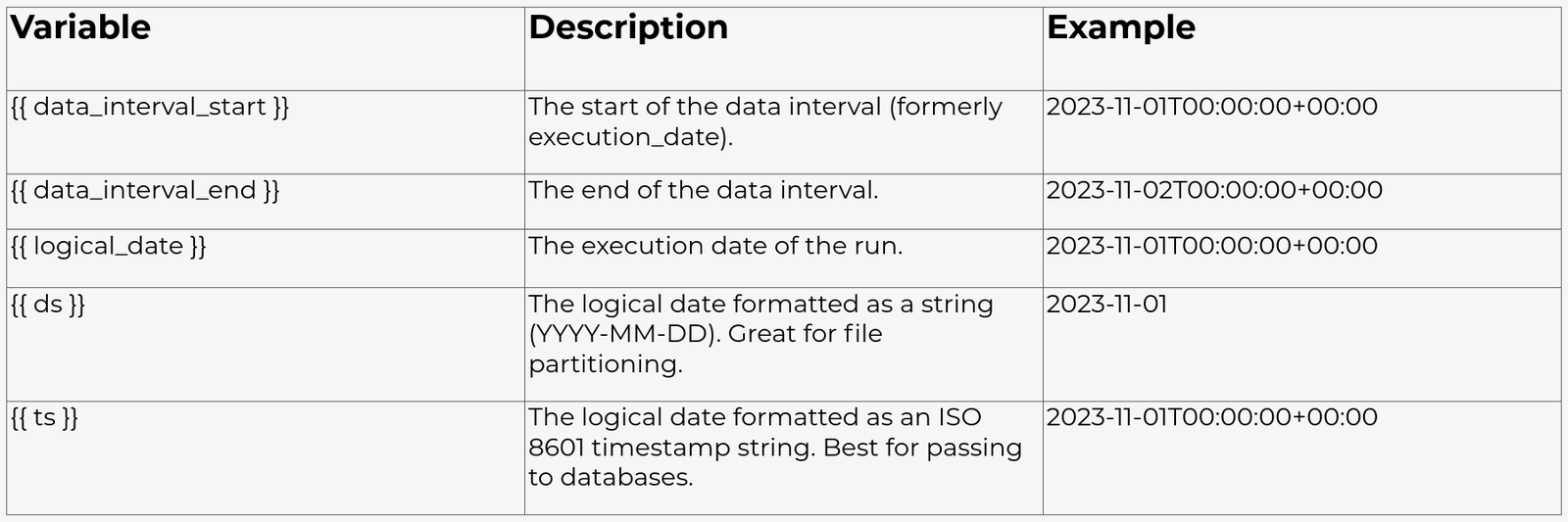
Here, we will use {{ ts }} because it provides the full timestamp in a standard format that is easy to cast in SQL. However there move variables available than the ones mentioned in the table above on the following web page https://airflow.apache.org/docs/apache-airflow/stable/templates-ref.html.
Passing variables via CLI
The easiest way to bridge the gap between Airflow and dbt is to pass the variable directly into the dbt run command using the –vars flag. This ensures that the context is bound to the specific task execution.
Step 1: configure the Airflow DAG
In your Airflow DAG, you likely use the BashOperator to execute dbt. You need to construct your bash command to accept a JSON string of variables.
***Quoting ***
dbt expects the –vars argument to be a valid JSON dictionary. This means the keys and values inside the JSON must use double quotes (“). To prevent the bash shell from interpreting these quotes, we must wrap the entire JSON string in single quotes (’).
Here is how to set it up in your Python DAG file:
- from airflow import DAG 2. from airflow.operators.bash import BashOperator 3. from datetime import datetime 4. 5. with DAG(“dbt_metadata_dag”, start_date=datetime(2023, 1, 1), schedule=“@daily”) as dag: 6. 7. run_models = BashOperator( 8. task_id=“dbt_run”, 9. # We pass the Airflow {{ ts }} macro into the dbt command 10. bash_command=“dbt run –select my_model –vars ‘{"dag_run_ts": "{{ ts }}"}’” 11. ) 12.
Step 2: Update the dbt model
Now that the variable is in the context, you can access it in your SQL model using the var() function. But this will cause issues if you run this model locally on your laptop, Airflow isn’t there to provide the dag_run_ts variable, and your run will fail. To prevent this, provide a default value (like run_started_at, which is a built-in dbt variable).
Here is the SQL for an example model:
- {{ config(materialized=‘table’) }} 2. 3. SELECT 4. id, 5. order_amount, 6. status, 7. – Get the variable 8. – Use a default if missing (for local runs) 9. – Cast the string to a timestamp 10. ‘{{ var(“dag_run_ts”, run_started_at) }}’::timestamp as dag_run_id 11. FROM {{ ref(‘stg_orders’) }} 12.
Now, every time this model runs via Airflow, the dag_run_id column will contain the exact logical timestamp of the DAG.
Observability with Elementary
While passing the DAG timestamp helps with data lineage (tracing rows), it doesn’t solve operational lineage (monitoring the health and stats of your runs).
For this, many teams turn to Elementary. Elementary is an open source dbt package that automatically collects run results and uploads them to a schema in your data warehouse.
What data does Elementary capture?
When you install the Elementary dbt package, it adds an on-run-end hook to your dbt project. This hook scans the artifacts dbt produces (run_results.json and manifest.json) and uploads them to your warehouse.
Without any custom Airflow configuration, Elementary captures the following data about your “Airflow-triggered” dbt runs:
- Run status and timing:
-
Success/Failure status of every model.
-
Execution time (duration) per model.
-
Exact start and end time of the job (dbt command/invocation).
- Data quality and volume:
-
Rows Affected: How many rows were inserted or updated in that specific run.
-
Freshness: When the source data was last loaded (if you use dbt source freshness).
-
Test Results: Pass/Fail status of all data tests associated with the run.
- Job identity:
-
The specific dbt_cloud_run_id (dbt Cloud).
-
The invocation_id (a unique GUID generated by dbt for every command).
Bridging Elementary and Airflow
By default, Elementary knows everything about dbt, but nothing about Airflow. It sees a run, but it doesn’t know “DAG A” caused it.
However, since Elementary simply reads the dbt artifacts, you can use the same logic we used above to enrich Elementary’s data. By passing Airflow metadata like {{ dag.dag_id }} and {{ ts }} into dbt environment variables.
- dbt_run = BashOperator( 2. task_id=“dbt_run”, 3. bash_command=“dbt run”, 4. # Pass Airflow macros as OS Environment Variables 5. env={ 6. “DBT_ORCHESTRATOR”: “Airflow”, 7. “DBT_AIRFLOW_DAG_ID”: “{{ dag.dag_id }}”, 8. “DBT_AIRFLOW_RUN_TS”: “{{ ts }}”, 9. # Required for dbt to find your project/profiles 10. “DBT_PROFILES_DIR”: “/path/to/profiles”, 11. **os.environ # Pass existing env vars if needed 12. } 13. )
Elementary can pick up custom_env_variables that are defined under the elementary variable block in the dbt_project.yml file.
- vars: 2. elementary: 3. # Tell Elementary to look for these specific env vars 4. # and save them in the ‘dbt_invocations’ table 5. custom_env_vars: 6. - DBT_ORCHESTRATOR 7. - DBT_AIRFLOW_DAG_ID 8. - DBT_AIRFLOW_RUN_TS 9.
This creates a complete observability loop:
-
Airflow triggers the job and passes the ID.
-
dbt runs the logic and stamps the data with the ID and ts (using the approach described above).
-
Elementary observes the run and logs the metadata and row counts for alerts and dashboards.
Achieving total pipeline visibility
By using dbt run –vars, every data row gets the exact Airflow logical timestamp ({{ ts }}) for perfect lineage. Integrating Elementary closes, the loop by monitoring run health and collecting metadata (like DAG ID) through environment variables. This ensures data is traceable, and your entire pipeline is observable. This solves both data quality and operational challenges.
References
https://airflow.apache.org/docs/apache-airflow/stable/templates-ref.html