
When querying an external stage you should be aware of the following limitations. You may encounter an error 001057, which relates to exceeding file descriptor limits. This error can occur during operations that involve listing or processing a large number of files in a stage. Let’s dive into the details of this error and explore strategies to address it effectively.
Error Details
001057 (0A000): Total size (>=1,073,741,912 bytes) for the list of file descriptors returned from the stage exceeded limit (1,073,741,824 bytes); Number of file descriptors returned is >=3,490,462. Please use a prefix in the stage location or pattern option to reduce the number of files.
The Total size here refers to the size of the file descriptors. The file descriptors are references to the selected files in the staging area. When querying or loading data, Snowflake accesses files from a staging area, which is a temporary storage location.
If the number of files or their combined metadata exceeds Snowflake’s threshold (in this case, 1GB or ~1,073,741,824 bytes), the database cannot handle the volume efficiently, resulting in this error. This typically occurs with large or unoptimized datasets, especially when files accumulate over time or when a generic query pattern (like a wildcard) retrieves all files in the stage.
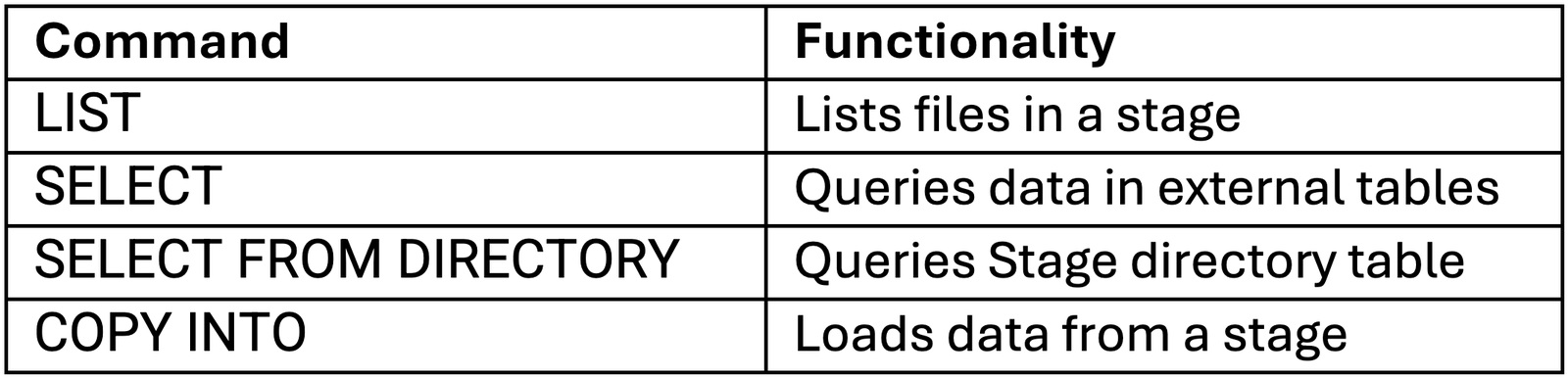
The error can be thrown by any of the operations listed in the table below.
Strategies to Avoid the Error
This limitation can be avoided by making sure you do not process more metadata than the limit in file descriptors. There are several approaches that can be implemented.
1. Minimize metadata by cleaning the stage.
Apply a snowflake PURGE or when using S3 buckets as externals stage use a lambda function to remove the data that is not required from the stage. An example of how the PURGE command can be used is shown below.
COPY INTO my_table
FROM @my_stage
PURGE = TRUE;
2. Querry only the required part of the stage.
Use the directory name, or part of the directory name in the stage to narrow down on the data you want to query. @stage_name/directory
For instance if you have the following folder structure on your stage:
my_stage/ ├── a_dir1/ │ ├── sub_dir1/ │ └── sub_dir2/ ├── b_dir2/ ├── sub_dir1/ └── sub_dir2/
Using the query below will only select data from directories that start with ‘b_’ in my_stage.
SELECT * FROM ’@my_stage/b_ ’
3. Use Patterns to Filter Files
In Snowflake, stages can contain many files, and sometimes the list of files may also include directories which do not contain data or data that we do not want to query. These directories can cause errors if not handled properly. The pattern option allows you to specify a regular expression pattern (enclosed in single quotes) that matches the file names or file paths. The files whose names or paths match the regular expression are the ones included in the query result. More specifically the pattern is applied before any data processing takes place, and it limits which files are included in the query.
For example, the pattern used in the select statement below will only query the files that have the string “data” in their file name and end with .csv.
SELECT * FROM @my_stage (PATTERN => ‘.data..csv$’);
Quick fix
If you are in a situation where the data that you need to query exceeds the file descriptors size limit a quick solution can be to loop over the query using a list of strings that represent the first several characters of the directory names that you want to query. This way you will query the stage in smaller chunks. You can use that same approach with the PATTERN. Keep in mind that this should not be a permanent solution.
1. Generate a List of Prefixes or Patterns
Create a list of strings representing directory names, prefixes, or file patterns.
2. Loop Through the List
Query the stage multiple times, each time focusing on a specific prefix or pattern. The example below uses letters but you can use this with any prefix of your directory names.
WITH prefixes AS ( SELECT column1 AS prefix FROM VALUES (‘a’, ‘b’, ‘c’, ‘d’, ‘e’, ‘f’, ‘g’, ‘h’, ‘i’, ‘j’, ‘k’, ‘l’, ‘m’, ‘n’, ‘o’, ‘p’, ‘q’, ‘r’, ‘s’, ‘t’, ‘u’, ‘v’, ‘w’, ‘x’, ‘y’, ‘z’) ) SELECT * FROM @my_stage WHERE directory_name ILIKE prefix || ‘%’;
This fix reduces the file descriptors processed per query, mitigating the snowflake error. However, this will increase the runtime due to the multiple queries that are ran. It is important to make sure the correct prefixes and patterns are generated and used.
Conclusion
Error 001057 reflects Snowflake’s limits on file descriptors during stage queries. To resolve this:
-
Keep stages clean using PURGE or lifecycle policies.
-
Use directories and patterns to narrow queries.
-
Split large queries into smaller chunks.
For more information you can consult the snowflake documentation on this topic :